
Icegate Registration Online – How to Register, Complete Process & Documents required
List of Services
AFLEO Consultants DGFT Regional office
- IEC and its modification/Yearly Update/IEC Surrender.
- Revoke IEC from DEL, Suspension, Cancellation etc / Merger/Demerger of IEC’s.
- DGFT Identity card.
- Advance License - Issuance and Redemptions
- Export Promotion Capital Goods (EPCG) License – Issuance and Redemptions
- Duty-Free Import Authorization (DFIA)
- Remission of Duties or Taxes on Export Product (RoDTEP)
- Merchandise Exports from India Scheme (MEIS)
- Services Exports from India Scheme (SEIS)
- Rebate of State and Central Taxes and Levies (RoSCTL)
- Transport and Marketing Assistance (TMA)
- Certificates of Origin (COO) – SAPTA, APTA, ISLFTA, GSTP, India–Dubai CEPA, etc.
- Import Monitoring System (IMS) – Steel IMS, Coal IMS, Copper/Aluminium IMS, Chip IMS
- Deemed Export Benefits – Apply for Refund of TED/DBK/Brand rate Fixation.
- Star Export House Certificate.
- Free Sale & Commerce Certificate, End User Certificate.
- Enforcement cum Adjudication Proceedings at RA Mumbai.
- E-RCMC Certificate from DGFT – APEDA, FIEO, EEPC, PHARMEXCIL, CHEMEXCIL ETC.
- Gems & Jewelry Schemes.
- Application for Interest Equalization Scheme.
- REX Registration.
- FREE SALE AND COMMERCE CERTIFICATE.
- Abeyance Cases for IEC’s in DEL.
- END USER CERTIFICATE.
DGFT HQ, New Delhi
- Norms Fixation - Handling 25+ Norms Fixation cases every month across various Product groups. (Engineering, Pharmaceutical, Chemical, Textiles & Leather, Plastic & Rubber, Food, Sports & Misc. products)
- Policy Relaxation Committee (PRC Matters) - Proudly representing 20+ cases every month.
- EPCG Committee Approvals - Handling 10+ complex cases every month
- Permission for Restricted/Negative list of Import Items & Export Items - Experience in Handling 100+ cases till date.
- Registration Certificates for Export & Import Items.
- SCOMET Licenses.
- TRQ (Tariff Rate Quotas)
- Appeal Matters under FTP.
Custom Related Services
- AA/EPCG/DFIA License Registration.
- Bond & Bank Guarantee (BG) Cancellation of EPCG/Advance License.
- ICEGATE Registration.
- Refund under Section 74.
- Pending Duty Drawback from Customs.
- Factory stuffing– Self-sealing permission. [FSP]
- Pending IGST Refund from Customs.
- Removal of IEC from the Alert list of Customs.
- GST Services – Refund of ITC from GST.
- Authorized Economic Operator (AEO T1, T2 & T3) certification.
- Reply & Follow-up of Customs Notices if any.
- GST Services – Refund of GST for Service Exporters.
- AD Code/IFSC Registration.
- SIIB Matters (Special Investigation and Intelligence Branch)
- SVB Matters.
- Registration Procedures for First-time Importers/ Exporters
- DPD/DPE Registration.
Other Certification:
- All Types of Digital Signature Certificates.
- Health Certificate for Export Products
- EPR Certification for Producers, Importers and Brand owners.
- Phytosanitory Certificate.
- BIS Certification.
- Banking & RBI related liaison for Exporters & Importers.
AFLEO logistics
- Sea Cargo Consolidation – Import & Export
- Sea Freight Forwarding - Import & Export
- Air freight - Import & Export
- Land freight
- Warehousing
- Customs clearance
- Insurance
AFLEO Global
- Buying of scrips - MEIS / SEIS / RoDTEP / RoSCTL / DFIA
- Selling of scrips - MEIS / SEIS / RoDTEP / RoSCTL / DFIA
Find our brochure for more details:
Table of Contents
Icegate Registration
- Overview - What is ICEGATE?
- What are the services offered by ICEGATE?
- Documents required for ICEGATE registration:
- Types of ICEGATE Registrations -
- ICEGATE Registration Process - Step by Step Guide
- Step 1 - Visit Home page of Icegate Portal
- Step 2 - Click on the Old Website Option
- Step 3 - Click on User Login/Signup Option
- Step 4 - Click on the Sign Up Now option
- Step 5 - Select your ICEGATE ID / Availability of credentials
- Step 6 - Enter IEC Number and click on Verify option
- Step 7 - Select Custom Location and click on confirm button
- Step 8 - Fill up the details and attach the DSC.
- Step 9 – Generation of OTP for authentication
- Step 10 - Enter a valid OTP to complete the registration
- Step 11 - Check Status of Registration
- Step 12 - Who Are We and Why Choose Us?
- FAQ’s
Overview - What is ICEGATE?
Indian Customs Electronic Gateway (ICEGATE) is the name of the public portal operated by the Central Board of Indirect Taxes and Customs (CBIC). The customs office provides e-commerce services to importers, exporters, freight carriers, and other business partners via this website platform. This simplifies the customs agreement process and promotes EXIM business.
Along with the website’s services, ICEGATE offers information regarding exporter guidelines and import compliances. It offers a single window for the online submission of paperwork linked to commercial transactions as well as the payment of taxes and customs fees.
More efficient Customs clearance has been made possible by ICEGATE’s internal connections to multiple partner agencies, including the RBI, banks, DGFT, Directorate General of Commercial Intelligence and Statistics(DGCIS), the Ministry of Steel, the
Directorate of Valuation, and other partner governmental organizations involved with EXIM trade. All electronic documents/messages handled by the ICEGATE are processed at the Customs level by the Indian Customs EDI System (ICES), which is operational at over 250 Customs ports.
For Indian importers and exporters, the tool is designed to speed up and ease the customs permission procedure. It makes it simple to track goods in actual time by offering a secure and effective location for electronic forms of bills of entry, cargo bills, and other customs-related documentation. Both Indian importers and exporters have to submit their customs documentation electronically with ICEGATE.
What are the services offered by ICEGATE?
Importers, exporters, freight carriers, and other business partners can electronically file documents with the Customs department. The ICEGATE website allows the Customs department to allow exporters and importers in getting shipping bills, bills of entry, and other documents required for the import & export processes. Among the most important services provided are:
- Electronic filing of the Bill of Entry (Import goods declaration)
- IE code status
- Shipping Bills (Export goods declaration)
- e-Payment of Customs Import Duty
- A free-of-cost web-based Common Signer utility for signing all the Customs Documents
- Facility to file online supporting documents through e Sanchit
- End-to-end electronic IGST Refund etc.
- 24X7 helpdesk facility
- Document Tracking status at Customs EDI
- Online verification of DEPB/DES/EPCG licenses
- PAN-based CHA data
- IGST Refund & DBK Status.
- Filing of RoDTEP & RoSCTL
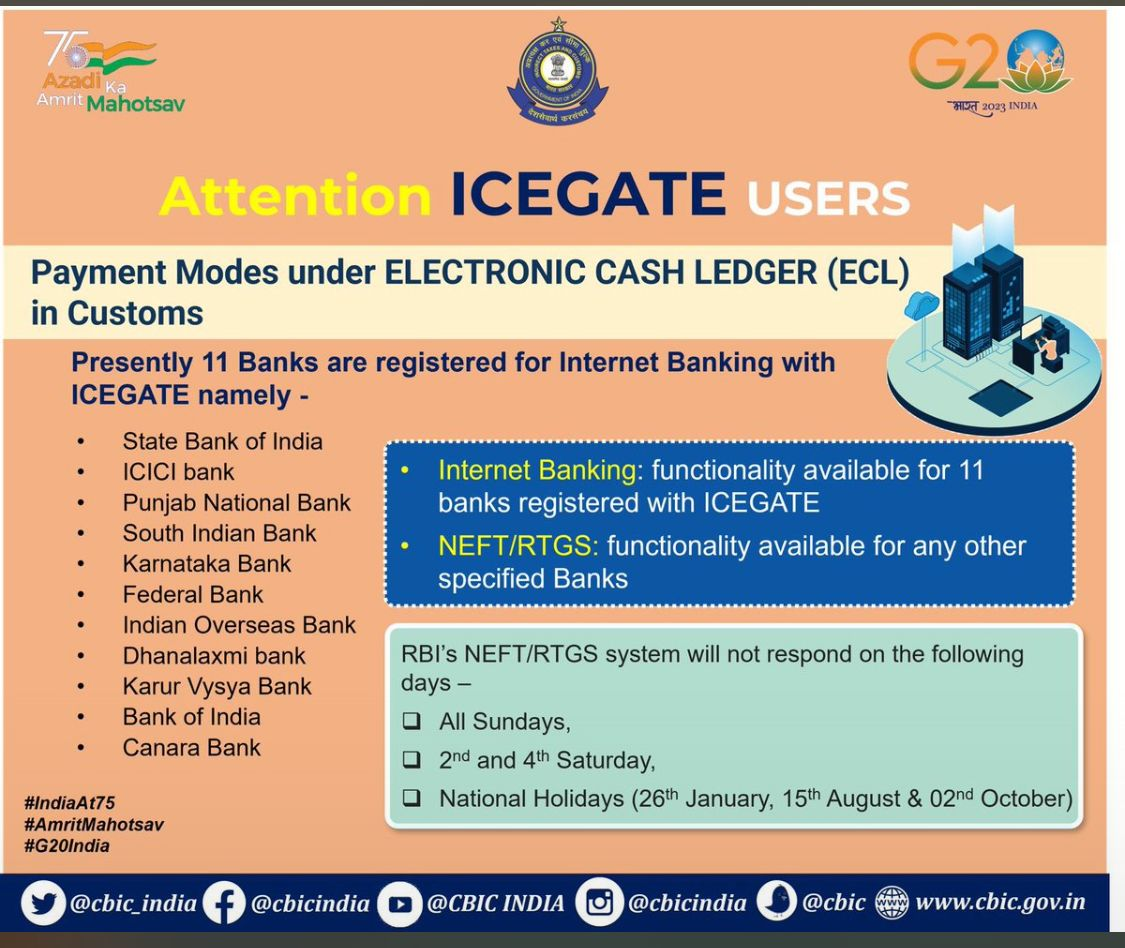
(Payment mode under Electronic Cash Ledger)
ICEGATE( Indian Customs Electronic Commerce / Electronic Data Interchange Gateway) is an e-commerce gate for Indian customs.
Documents required for ICEGATE registration:
- Updated IEC copy with Authorized signatory’s sign and stamp
- A class 3 digital signature is required ( DSC)
- Self-signed copy of Aadhaar card
OR
- Self-signed copy of Voter ID card
OR
- Self-signed copy of Pan card
- Authority Letter – Should be signed by the Applicant and other authorized partner/director signatures to approve the applicant. (This is applicable for partnership firms, private limited companies, and limited liability partnerships[LLP])
Apart from the above-mentioned documents, depending on the category of registration (i.e. customs broker, IEC holder, shipping agent, etc.), you will be required to submit a few additional documents.
Am I eligible for this scheme? – Yes, once the MEIS Scheme is stopped by the Govt. Thereafter, eligible exporters can apply under the new RoDTEP Scheme.
Types of ICEGATE Registrations -
ICEGATE Registration Process – Step by Step Guide
To engage in electronic customs-related documentation, importers and exporters are required to use ICEGATE. With the launch of the ICEGATE portal, the Customs department has made registration easy and simple.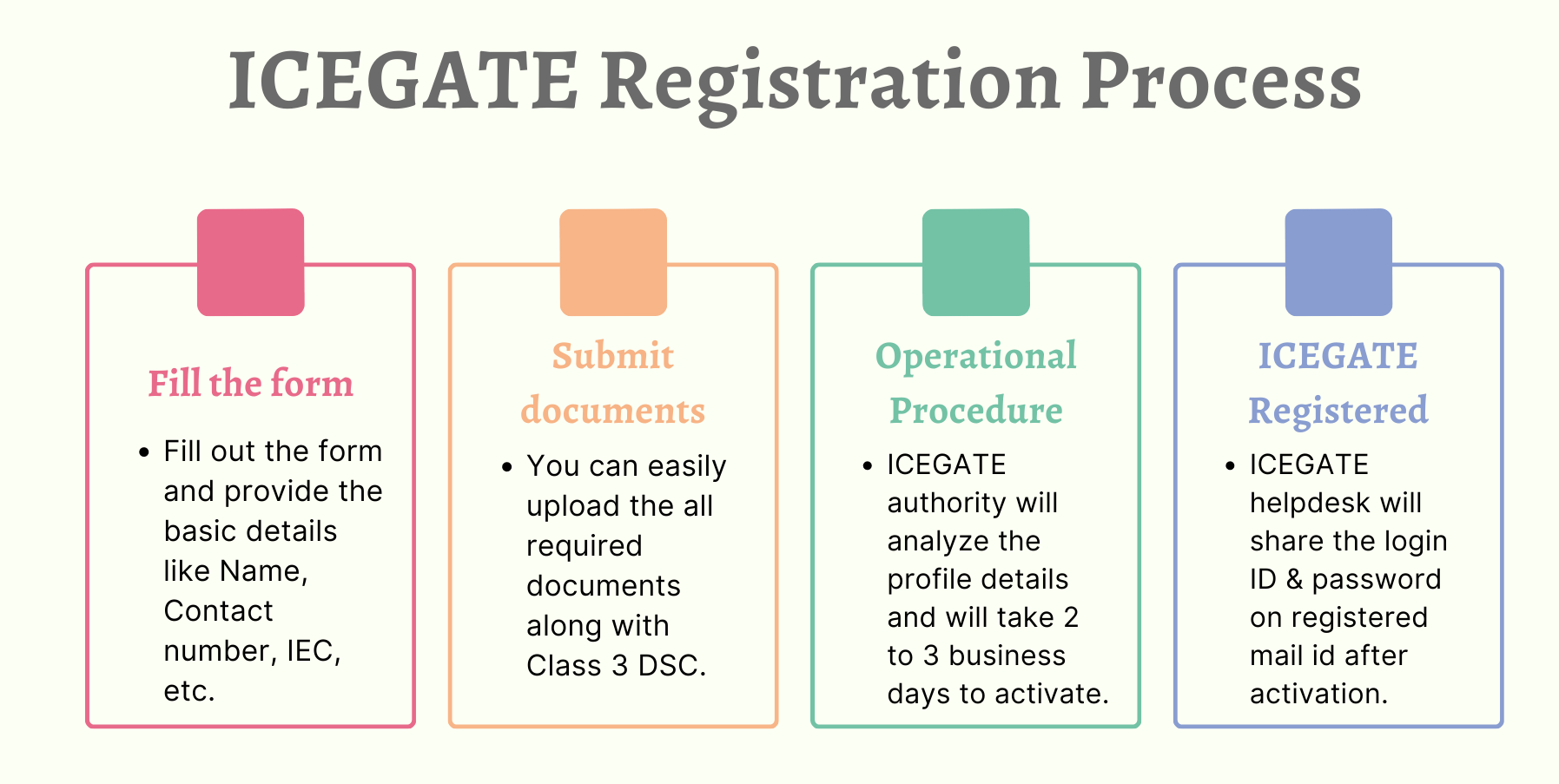
Step 1 – Visit Home page of Icegate Portal
Visit the Icegate portal at https://www.icegate.gov.in/ and click on the “Login/sign Up” link.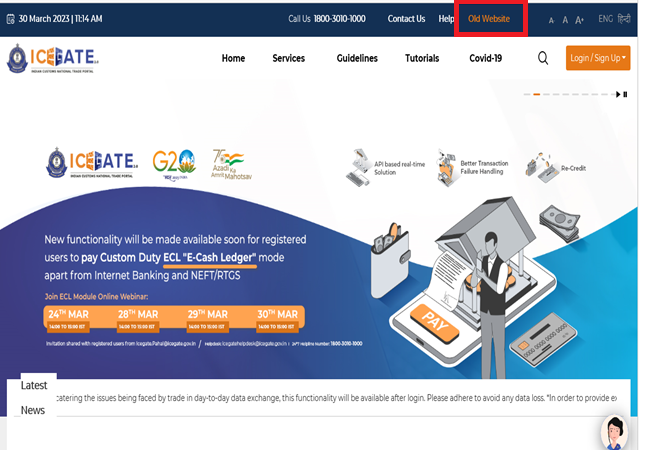
Step 2 – Click on the Old Website Option
Click on the “Old Website” given on the homepage to proceed with icegate registration. Step 3 – Click on User Login/Signup Option
After clicking on the old website, Click on the “User login/Signup” option on the Homepage of ICEGATE.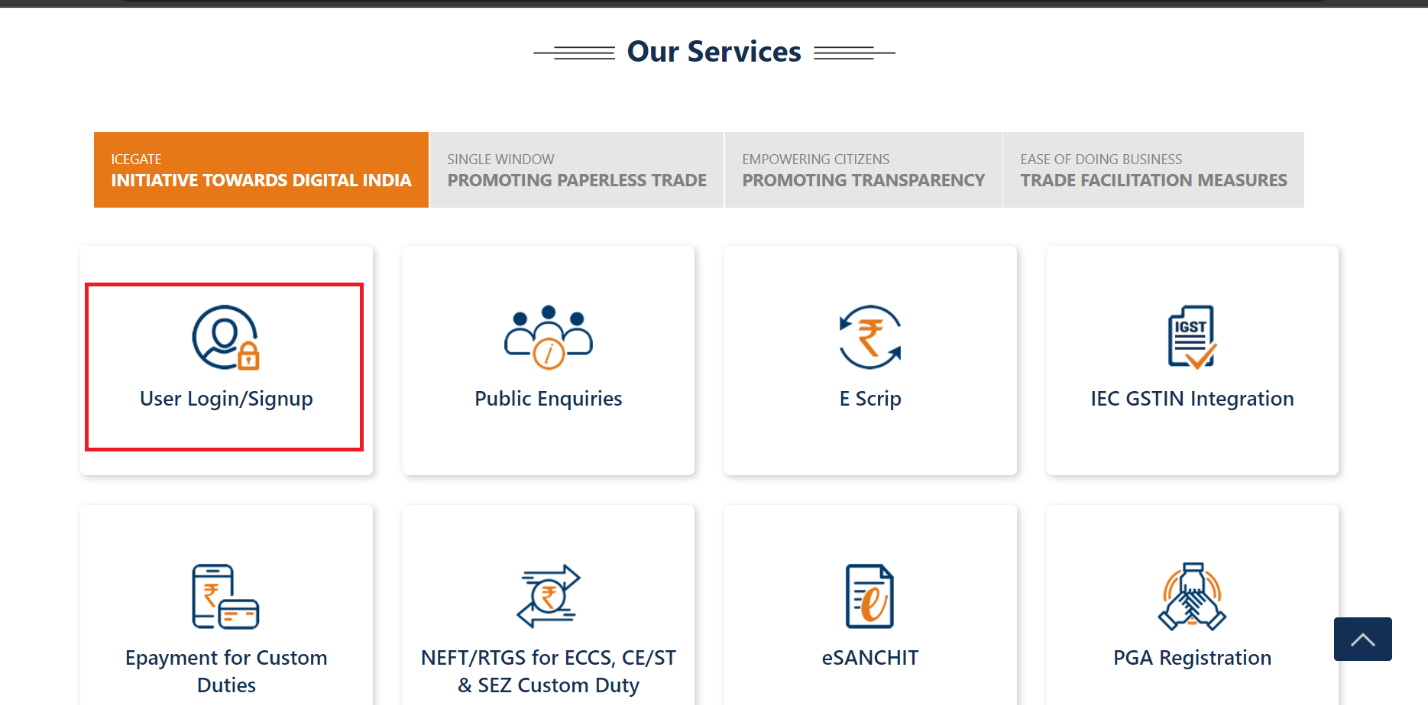
Step 4 – Click on the Sign Up Now option
To register on ICEGATE the applicant will have to click on the option of “Sign up now”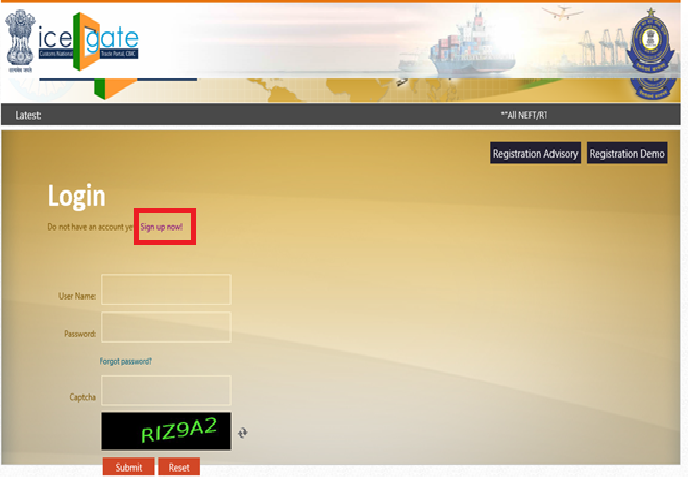
Step 5 – Select your ICEGATE ID / Availability of credentials
The applicant needs to provide his/her ICEGATE ID and email id. The id will be of the applicant’s choice. The ICEGATE id should be unique else the page will not accept it.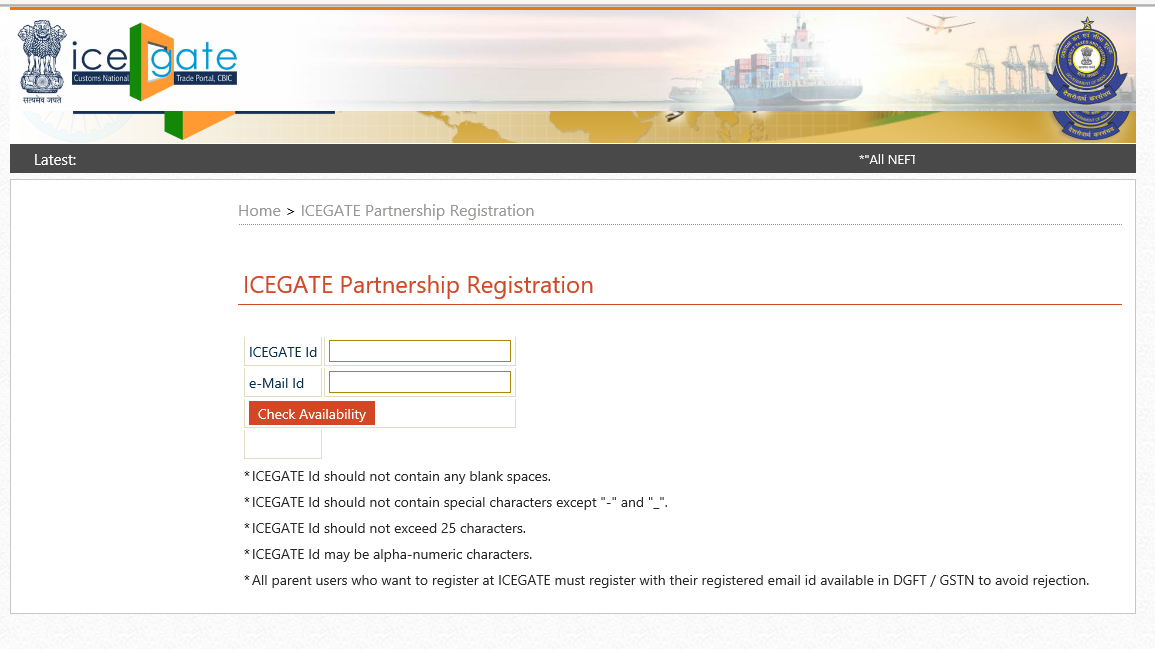
Step 6 – Enter IEC Number and click on Verify option
After clicking on check availability the next screen will appear to fill up the details as in the image below. Provide essential details and fill out the registration form.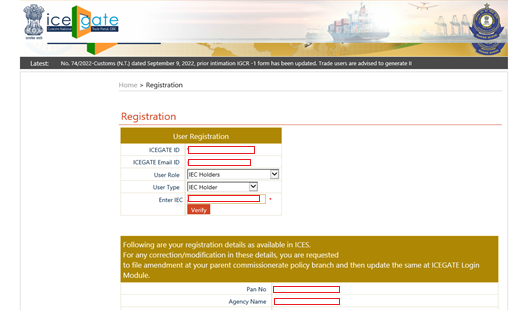
Step 7 – Select Custom Location and click on confirm button
Once all details are filled up in the form, click on Verify to check all IEC details which are mapped to IEC number as shown below: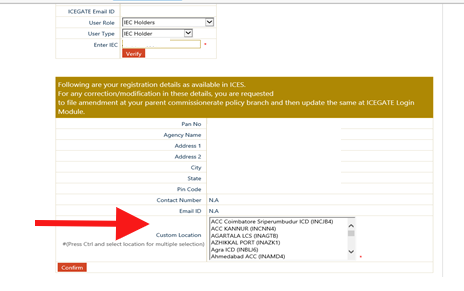
Step 8 – Fill up the details and attach the DSC.
Once clicked on the “confirm” tab, the page will go to the next step to fill in all the details like name, mobile number, aadhar no & documents. Mobile number and email id should be the same as DGFT registration. For this step, DSC should be connected to upload the documents.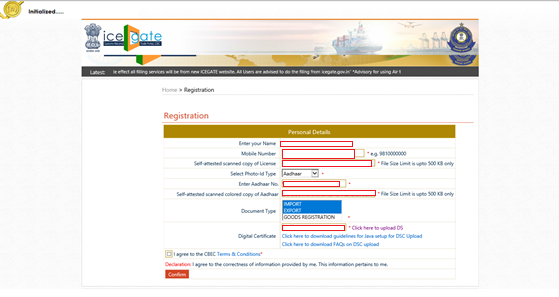
Step 9 – Generation of OTP for authentication
The applicant will receive the OTP on the registered email id for authentication.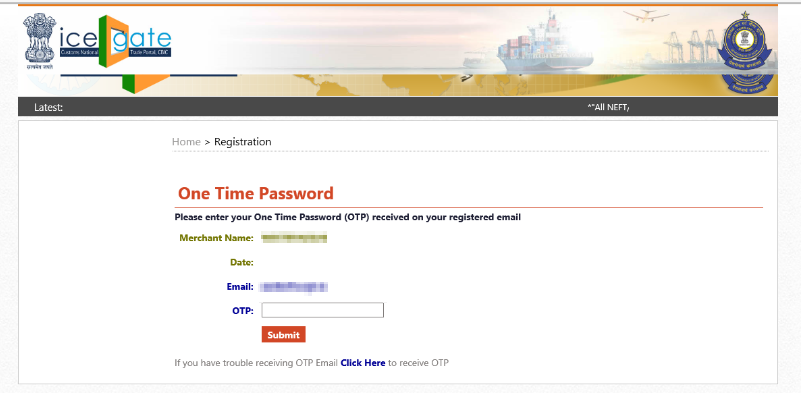
Step 10 – Enter a valid OTP to complete the registration
Applicant will receive the confirmation about the registration on his/her registered mail id stating that “your information has been received successfully & you will be intimated by email as soon as your registration approved by the competent authority”. To get Final confirmation of approval of Icegate Registration please wait for confirmation from ICEGATE, which usually takes two to three working days. A user ID and password for accessing your profile will be sent to your registered email address after your request has been accepted.Step 11 – Check Status of Registration
Users can check the status of their submitted documents by logging into the ICEGATE website with their registered ID. To check the status of your registration follow the steps below: i. Click on “ICEGATE Registration Verification”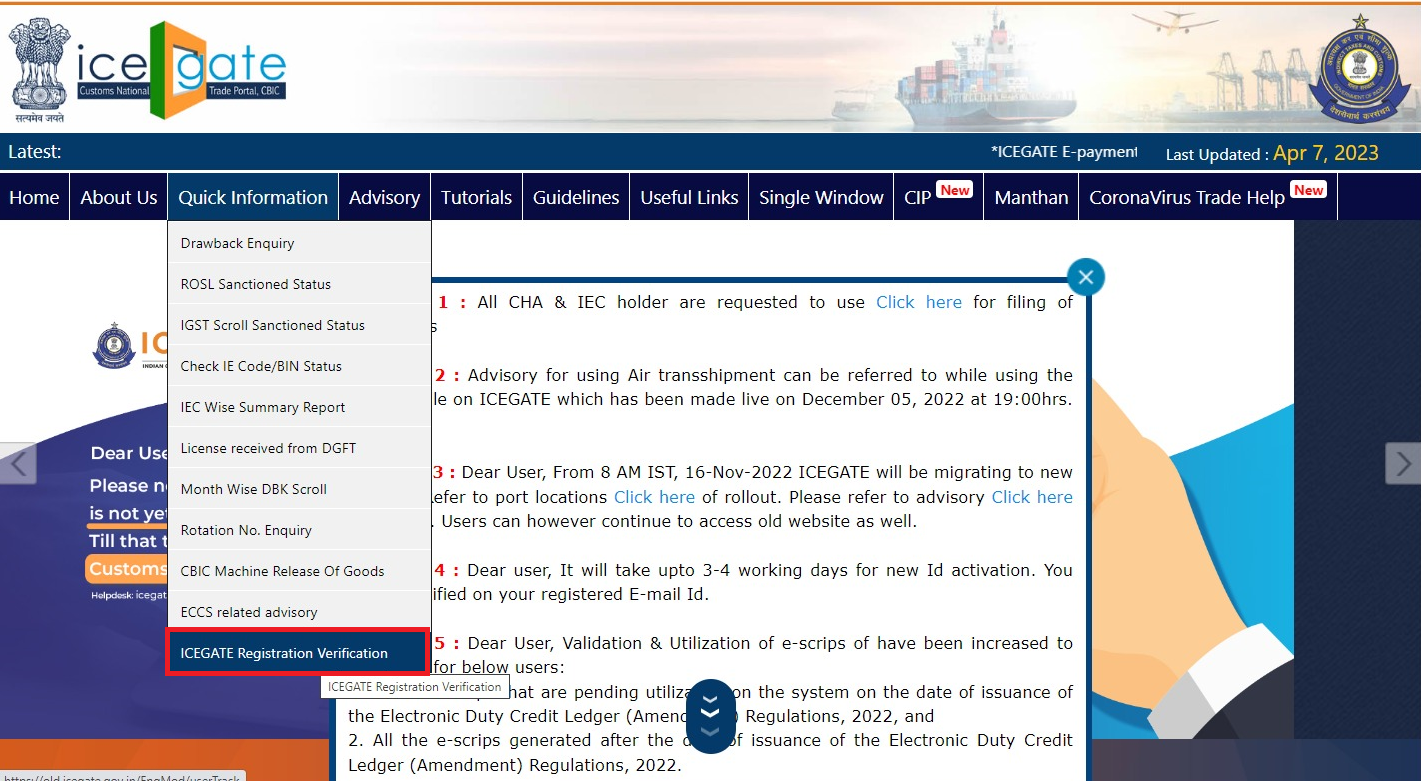
(Icegate registration Verification)
ii. Enter “PAN No. & Image Letters” and click on submit to check the status of your ICEGATE registration.
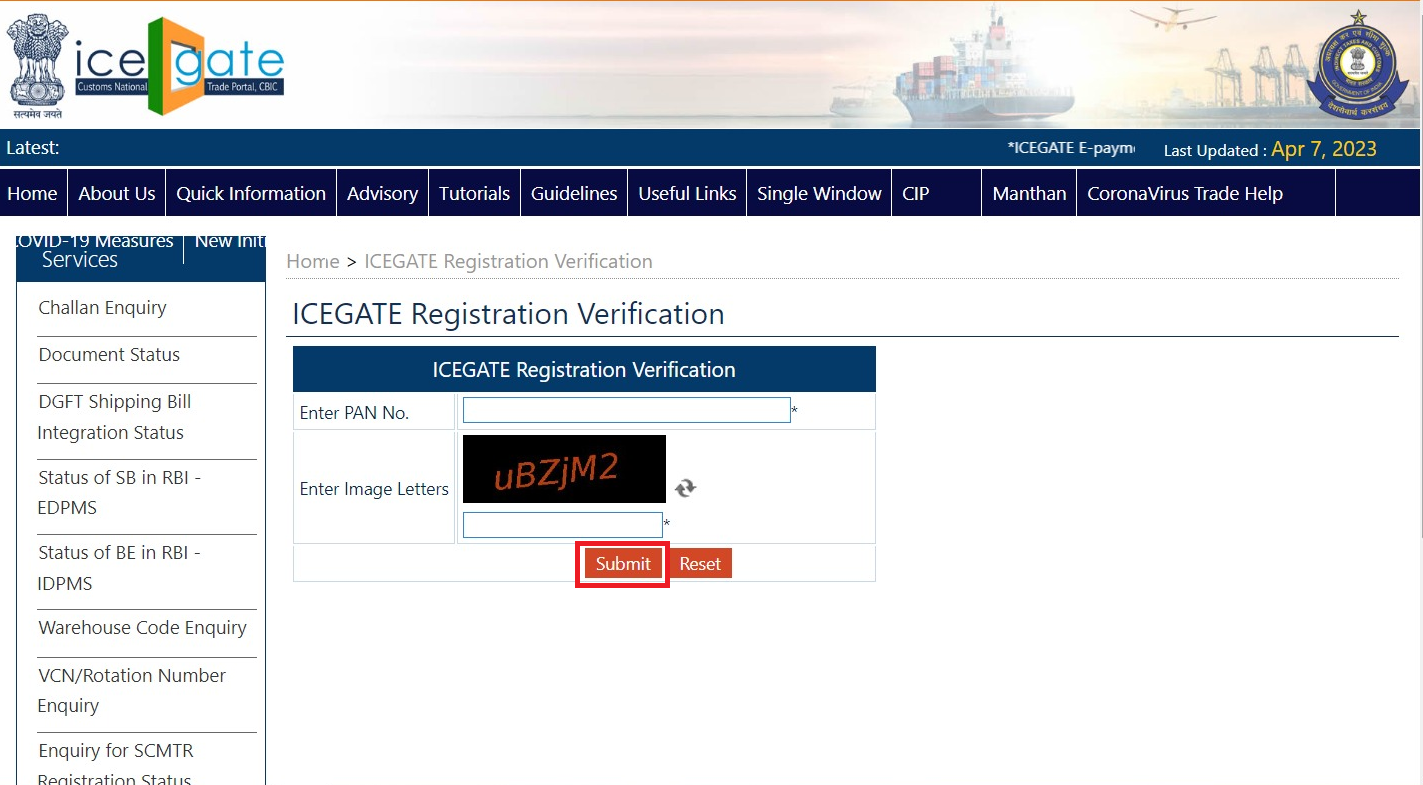
(Enter Pan no to check the status of registration)
iii. If your registration is active then it will show the below link with details of “ICEGATE ID” & “Registered Since”
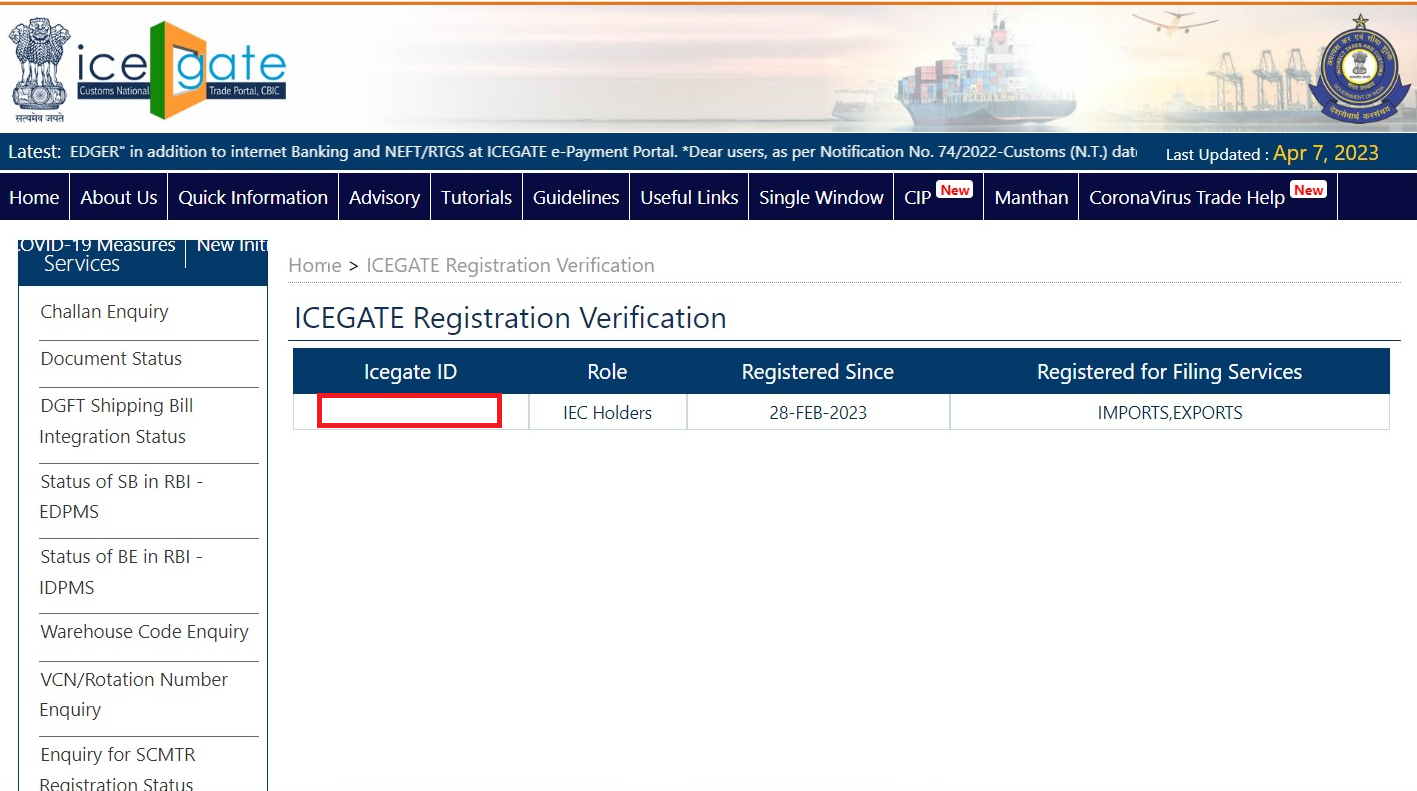
(Enter Pan no to check the status of registration)
iii. If your registration is active then it will show the below link with details of “ICEGATE ID” & “Registered Since”
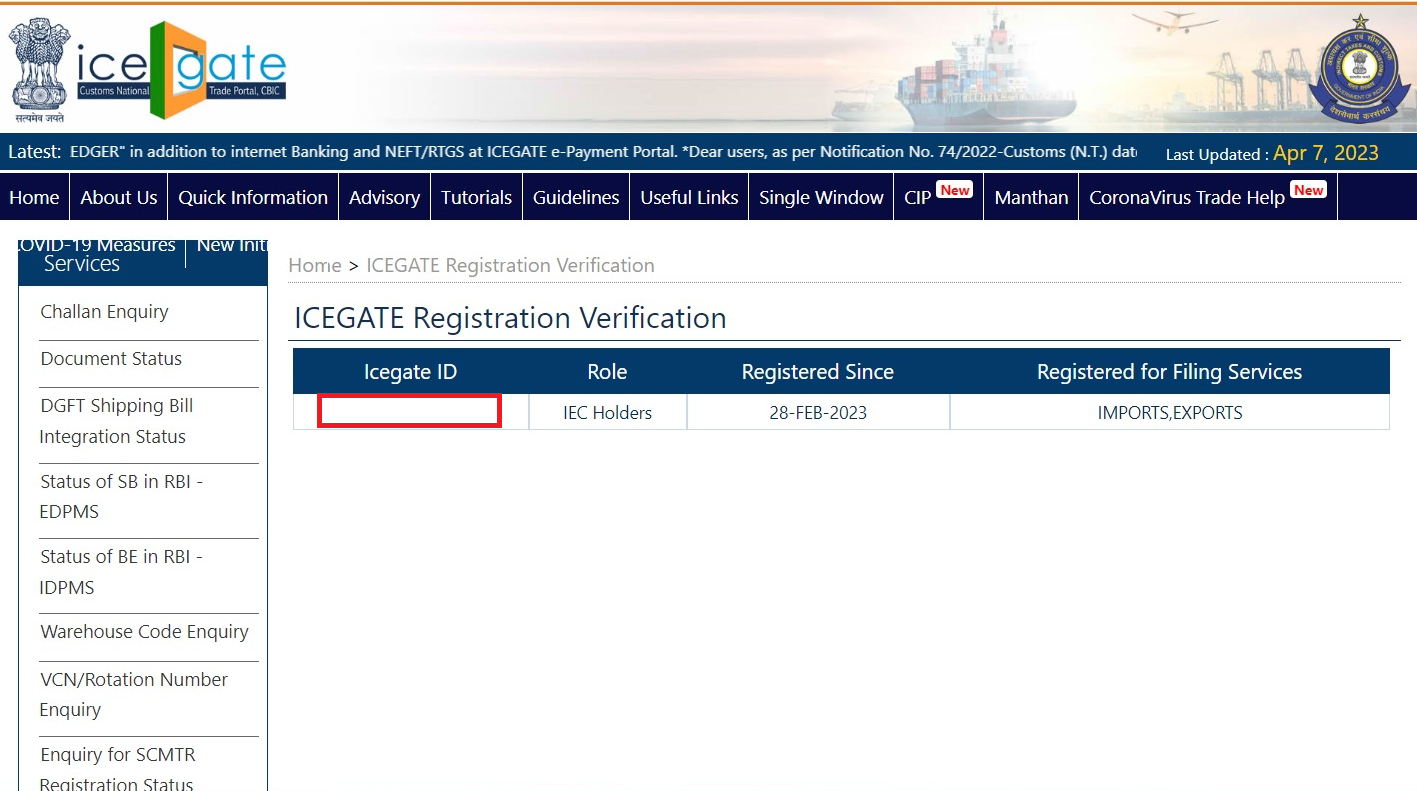
(status of icegate registration-Accepted)
OR
iv. It will show the below image if the ICEGATE ID is not active with the definition of “No record found for this PAN number. User is not registered with ICEGATE”.
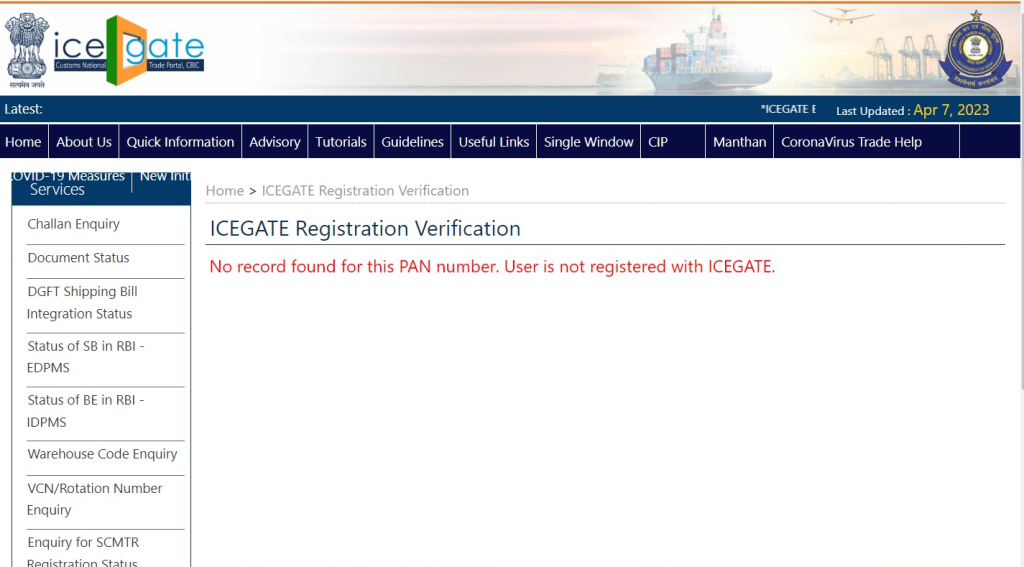
Step 12 – Who Are We and Why Choose Us?
We at Afleo Group, are a team of DGFT & Customs Experts having a rich experience of 10+ Years in Exim Consultancy & International Logistics [Freight Forwarding]. With our vast knowledge and experience in this field, we can help you with all your requirements about ICEGATE registration in a fast & efficient manner. we are well-equipped to handle the logistics of global trade with efficiency and expertise. Let us handle the logistics while you focus on growing your business. Contact us today to learn more about how we can help you streamline your supply chain and increase your bottom line. We are dedicated to providing efficient and cost-effective logistics services to help our clients. So do get in touch with us for any of your requirements and our team will be happy to help you.FAQ’s
Why do I need to register for ICEGATE?
One must be registered to file documents online. As a result, an ICEGATE ID must be registered to fill out online Shipping Bills, Bills of Entry, and other papers.
Who needs the icegate registration?
Any Import Export Code (IEC) holder or F-card holder (who has cleared the customs broker exam) can register on ICEGATE. It is mandatory for exporters to obtain customs clearance and related export documents before shipping from India. You can check the below image for referenc:
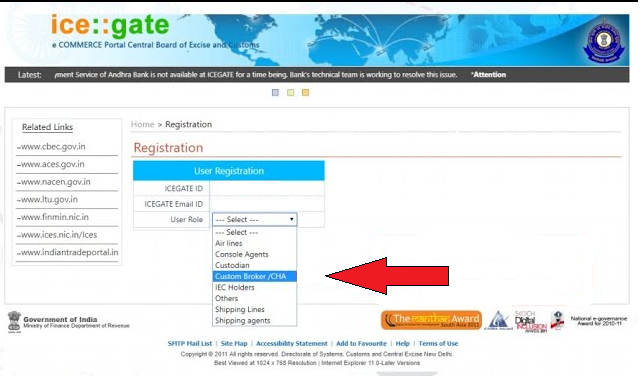
What are the advantages of registering with ICEGATE?
The following are some benefits of registering with ICEGATE-
- ICEGATE allows tracking the status of various online-filed papers.
- The registered email address of the ID holder or user will be utilized to inform them of the import and export status.
- Receives remarks on their work, whether positive or negative, that is sent to the authorized dispatch address, including SB and BE data analysis.
The ICEGATE offers a variety of services, such as online payments, following the status of documents using a registered ID, finding the status of import-export codes (IEC), and export Incentive scheme applications like RoDTEP & RoSCTL.
Can I register in the Icegate portal without DSC?
No, ICEGATE Registration can be done with a Valid Class – 3 Digital Signature Certificate (DSC) only
Which Digital Signature is required for ICEGATE registration?
The use of a Class 3 digital signature Certificate (DSC) has been approved by ICEGATE for cargo and trade organizations, import and export companies, custom brokers, and other parties.
How can I check registered ports on ICEGATE?
Users can get registered for all the above-referred transactions at all the EDI Customs Ports with a single registration on the ICEGATE Portal, for list of ports check the customs locations box on registration page
Is it required to submit documents by registered mail?
As a step to facilitate business, the user’s registered mail id is not required to be used to file the Shipping Bill and Bill of Entry paperwork. But, only the registered email address will receive the status and inquiries regarding his filed applications.
How can I find out the status of my documents?
By entering their registered ICEGATE ID and selecting the Document Tracking System link on the ICEGATE website, users may keep track of the progress of their submitted papers.
Can I add new services to my registered ICEGATE ID if I am already an ICEGATE registered user?
Yes. You can add more locations and transaction types using your previously registered ICEGATE ID. From your registered email address, which relates to the ICEGATE id that is being updated at ICEGATE, send a request with all of your relevant information to [email protected].
Is it possible to change my ICEGATE ID?
No, Your ICEGATE ID cannot be changed or edited. The ICEGATE ID assigned to each registered user is unique and cannot be modified.
Can I get my profile modified/updated at ICEGATE?
Yes, you can do modifications. For the same, you need to send an email request from your registered mail id on [email protected] with complete details of modification/updation.
What is simplified Icegate registration?
The simplified Registration Module in ICEGATE is designed to register at ICEGATE without the need to upload the Digital Signature Certificate (DSC), PAN verification, document upload to ICEGATE, and approval procedure.
How to migrate from Simplified Version to New version of Registration -
Go to the Tab of Simplified Registration from our services section
To deactivate the simplified profile of registration choose the 3rd option.
Fill in the information of the icegate id and click on the search button.
What is Icegate Registration Approval Time?
To get Final confirmation of approval of Icegate Registration please wait for confirmation from ICEGATE, which usually takes two to three working days.
A user ID and password for accessing your profile will be sent to your registered email address after your request has been accepted.
(Enter Pan no to check the status of registration)
iii. If your registration is active then it will show the below link with details of “ICEGATE ID” & “Registered Since”